Showing posts with label Mobility. Show all posts

Thursday, May 22, 2008

INDY DownForce And Marketing Blunders

Promotional graphic used by INDY DownForce to promote mobile information alert applications. Non-sponsoring company product married to a log-time IRL racing team and series sponsor from the same mobile products industry. Graphic Credit: INDY DownForce broadcast email to inbox

INDY DownForce And Marketing Blunders

Mark this down as one of those - "What's Wrong With This Picture?", episodes.

To the casual observer, this issue may not mean so much … but to sponsoring entities that pay big bucks to support an advertising and branding awareness campaigns, this blunder is BIG.

This morning, we at Symblogogy received an announcement from the fansite of the Indy Racing League informing fans of a new and free function one could bring to their mobile phones.

The text from the email alert reads as follows:

IndyCar Mobile gets you FREE, convenient access to IndyCar Series racing at your fingertips. Get the inside edge on racing action with features such as:

Just Released!

RITMO Mundo Timing and Scoring - Breaking News - Race Videos - Photos - Discounts - IndyCar Nation and more...

The problem comes when one looks at the photo used to illustrate and draw attention to the free offer. The photo features a BlackBerry mobile phone with Danica Patrick’s - Andretti Green Racing, MOTOROLA Sponsored Dallara racing machine in front to emphasize the IRL Timing and Scoring feature tie-in.

Think of the symbology …

Doesn’t anyone understand Marketing 101 down there at INDY DownForce? Isn’t there any sensibility to the ties of who sponsors what, and if it makes sense to have a non-sponsoring company’s product (BlackBerry, RIM) be shown prominently with a strong, competitive sponsoring company effort (Motorola)?

Why couldn’t INDY DownForce have stripped up this marketing graphic using a Motorola RAZR … or similar Motorola product as opposed to a RIM manufactured product?

How are IRL racing teams going to relate the value of sponsorship with this type of vision and lack of collaborative support?

The fact remains that many teams have started the first three races of the ICS season with little or NO SPONSOR SUPPORT on their sidepods!

This is a blunder … a BIG marketing blunder indeed!

Monday, October 15, 2007

Computer Mobility For Fixed, And/Or Rolling, Assets

The Fit-PC is a fully self-contained PC, complete with hard drive, that’s less than five inches square. Image Credit: ExtremeTech

Computer Mobility For Fixed, And/Or Rolling, Assets

Embedded computer power becomes inexpensive, small, and packaged for inclusion in any data capture, communication, security, and computer processing application.

An Israel based company, CompuLab, has come up with a better computer mousetrap. Named the “fit-PC”, this computer can be made to fit nearly anywhere because it is not only small in size, it only requires 3.5 watts of total power to operate.

The fit-PC offers two USB 2.0 ports, dual fast Ethernet (10/100) ports, a VGA connector, audio jacks, and an RJ-11 jack. The RJ-11 jack isn't a modem, but subs in as a dumbed-down RS-232 port. Two audio jacks are also built in. Image Credit: ExtremeTech

This excerpted and edited from ExtremeTech –

Fit PC—A Tiny Linux PC that Fits Anywhere
By Loyd Case – ExtremeTech – October 12, 2007

Fit-PC is the brainchild of the Israeli company CompuLab, a manufacturer of embedded, low power systems. In fact, if you check out CompuLab's web site, you'll find the ENC-iGLX, which is essentially the fit-PC without the operating system.

Although the fit-PC web site mentions that it's shipped with Gentoo Linux, the system arrived on our doorstep with Ubuntu Feisty Fawn (7.04) installed. You can also download Windows XP drivers from the fit-PC web site, but you'll need to install Windows yourself.
----
The Fit-PC includes a 2.5-inch, 40GB hard drive. Image Credit: ExtremeTech

The CPU used in the fit-PC is an AMD Geode LX800, which is a fully self-contained System-on-a-Chip (SoC). The memory controller, graphics processor, and I/O are all self-contained inside the LX800, which clocks at 500MHz. The entire system, including hard drive and 256MB of main memory, uses 3-5W of total power. The built-in graphics can drive displays up to 1920x1440, but it's noticeably more responsive at 1280x1024 or less.

Since it's so tiny, it can fit into a myriad of locations that even a mini-ITX system wouldn't work. Of course, a display, keyboard and mouse take up room, but you can always control it via a network connection once you get it set up. The fit-PC is also useful as a small dedicated box. Since it has two Ethernet ports, it can be used as a Linux-based firewall or router.

Alternatively, it can be used as a shared web browsing and email station where space is at a premium.

The fit-PC in Action

We connected the fit-PC to a 17-inch LCD display, attached a USB keyboard and mouse, piped in Ethernet, and fired it up. After logging in, we were greeted with the main Ubuntu screen, and prompted to download and install 122MB of updates.

Since this tiny system is based on a 500MHz SoC, we didn't bother with running any standard benchmarks—it would just make the system look bad. The point of the fit-PC is not to be blazingly fast, but to do one or two things well enough to be usable.

We fired up Firefox and spent some time browsing the web. Some Flash-intensive web sites rendered slowly, but most web browsing seemed no worse than running on an older laptop with integrated graphics. We also loaded up OpenOffice apps to check them out. After we had six windows (and six apps) running, the system definitely became sluggish—this is not a strong multitasking system.

Final Thoughts: A Good Fit?

If you need anything that requires even moderately demanding CPU or graphics horsepower, the fit-PC isn't the right solution. Performance is not the point of this system—form factor and cost are the main factors.

The fit-PC is priced at $285, which includes the hard drive and pre-loaded Linux OS. While you can build a PC that's nearly as inexpensive, or buy a used laptop for not much more, the fit-PC's unique form factor gives it an edge in any environment where space is at a premium.

Also, its extremely low power usage means you can keep the system running all the time. In any application that requires always-on usage and a light duty applications mix, the fit-PC may indeed be an ideal fit.
Reference Here>>

For dedicated business applications (warehousing, access control & biometrics, RFID, route accounting, and etc.) that require some computing power and programs to run, this small (25 square inches), power thrifty (3.5 watts) handles up to be a tidy, embedded package.


Thursday, September 27, 2007

The Birth Of Mobility Honored At The Smithsonian

Introduced together with the TI-58 these calculators introduced a novelity, the Solid State Software Modules™ with up to 5000 program steps. On the backside of the TI-58/59 you'll notice a small lid with a place for a module. The Master Library with 25 different programs was included, a lot of other modules were available. Image & Caption Credit: DATAMATH CALCULATOR MUSEUM

The Birth Of Mobility Honored At The Smithsonian

Texas Instruments introduces the handheld calculator and the tools that enhance our business, communications, and entertainment lives ... changed the way we all relate to the world we live in forever.

The consumer electronics revolution (the evolution and packaging of electronic devices that have come to aid our lives over the last forty plus years) also created the enterprise mobility revolution and spawned the competitive growth of many of the retail giants of today.

TELXON PTC-610 ADVANCED HANDHELD COMPUTER - Telxon's PTC-610 proves the old adage that good things come in small packages. From a price/performance standpoint, this small but mighty Portable Tele-Transaction Computer is one of the most advanced, low-cost handhelds in the industry. Image & Caption Credit: OPAL

By employing calculators that were redesigned with built-in memory and barcode symbology scanning capability, small regional companies like Sam Walton’s Wal-Mart employed data collection and accounting techniques that allowed the business effort to outstrip the competition. Timely and correct information about inventory levels was the key to this mega-store retailing growth and enterprise mobility datacollectors that Sam Walton and others utilized was the tool.

Today, the functional capabilities of consumer electronics and enterprise mobility are beginning to blend and become the same. Cellphones, cameras, and computers are morphing into devices that are equally useful to both dedications.

Consumers use cameras on cellphones to capture information through symbology and WiFi (PWC/PWH applications) in much the same way the associates at Wal-Mart or PETCO read symbols (barcodes) to gain information on which to base decisions and lead more successful lives.

The Smithsonian Institute recognizes the beginning of this revolution with a museum honor.

Excerpts from Computerworld -

TI's first handheld calculator is now a museum piece
Smithsonian honors pioneering device; co-inventor remembers 'progress on a daily basis'
By Patrick Thibodeau - Computerworld - September 26, 2007

In 1965, the consumer electronics revolution that would result in PCs,
iPods, smart phones and myriad other electronic devices was still years off. And the predecessors of the integrated circuits that would power such products were being used mostly by the military.

But inside
Texas Instruments Inc., an effort began to change that.

Jerry Merryman was part of a small team at TI given the task that year of creating a handheld calculator. Numerous problems arose, according to Merryman. The calculator had to work at low power, and it required a reliable keyboard and a chip with thousands of transistors. Nevertheless, a working model was delivered 18 months later, in 1967 -- giving TI the world's first electronic handheld calculator.

Merryman was asked at a ceremony held here on Tuesday if he thought the device would have the impact that it did. "No, really," he said. "I thought a few accountants might use them. I thought some engineering students might get them as presents. It was only later that I realized we were kicking off [the electronics] revolution.

TI's calculator became commercially available in 1970 and already is a part of the IT collection at the Smithsonian Institution's National Museum of American History. The museum also has the original 1967 prototype, which weighed 3 pounds, was encased in aluminum and ran on batteries. At the time the calculator was developed, existing models were heavy desktop devices -- not handhelds.

At yesterday's ceremony, the
Smithsonian expanded its collection to include two of the first programmable calculators, the TI-58 and TI-59.

The Texas Instruments "Programmable 58" (1977) was TI's middle range programmable calculator. The TI58 and TI59 (below) are based on the same design, and are almost identical (In fact, they came with the same manual). The TI58 has 1/2 the internal memory (240/480 steps), and lacks the magnetic cards available on the TI59. The model shown is a 'C' version, which stands for "Constant Memory" - this calculator retains user written programs when powered off. Image & Caption Credit: claccicmp.org

"Think about how these innovations affected our lives," said David Allison, a curator at the museum who called TI's calculator a unique device that "touched the lives of all Americans."
----
Despite the sweeping ambition of the original handheld project, Merryman said the calculator was developed without a set budget. "It was just work that we did in our spare time," he said. Merryman was joined at the Smithsonian's ceremony by another member of the team, James Van Tassel.

A third member, TI engineer Jack Kilby, died in 2005. Kilby invented the integrated circuit at TI in 1958 and later won the Nobel Prize for his work, which included holding 60 U.S. patents.
----
The initial calculators could handle basic math functions only. Nonetheless, Merryman believes that the devices helped students tackle more difficult problems. And math education is essential, he added.

Lovett said that technical jobs are growing at a double-digit rate in the U.S. But only 17% of undergraduates leave their schools with a math or science degree. In China, that percentage is 52%,he said, and in South Korea, it's 41%
.
Reference Here>>

In this world of New Media - Mobility is king!

This mobility technology has become the technological backbone of the New Media paradigm. Cellphones with memory, photo capability, & WiFi are the tools that have become citizen (and more, professional) journalism cornerstones.


Saturday, May 19, 2007

Mobility Devices - The Tail That Wags The Dog Of Digital Signage

Traditional Digital Signage - Image Credit: Digital Signage Expo (formerly Digital Retailing Expo) - ExpoNation LLC

Mobility Devices - The Tail That Wags The Dog Of Digital Signage

People who make their living in the arena of visual communications are just now beginning to grapple with the power of the very small screen platform. This realization was not made any clearer than what transpired in a recent discussion panel held at this week’s Digital Retailing Expo - May 16 & 17, 2007 at the Navy Pier Exhibition Center in Chicago, IL.

Notably missing were discussions about the appropriate use of “BlueCasting” (Blue-Jacking … Bluetooth Delivered Messaging) and Physical World Connection concepts through which one might deliver a digital message to the mobility device screen.

Truth is that the tail-that-wags-the-dog of large digital displays will soon be the delivery of digital content to cell radio, WiFi radio, and Bluetooth enabled devices with little screens … not handheld devices with little screens used to influence big screen displays as the discussion suggests.

Digital retailing on a handheld is just now on the radar of ALL of the industry experts.

Excerpts from Marketing At Retail (POPAI) -

Mobile Phone as Key to Digital Retail
Editorial: David Keene - Marketing At Retail - 5/18/2007, 5:12:01 PM

The Digital Retailing Expo changed its name this year to the Digital Signage Expo, to take advantage of the growing concern for anything digital signage in retail, transportation, education, and corporate environments. But in Chicago this week, the city that arguably gave rise to the modern retail industry, the Digital Signage Expo kicked off under its new moniker with perhaps more buzz about things retail than any other vertical market.
----
On Wednesday [May 16, 2007], one of the most compelling panels was "Going Mobile". Moderator/Presenter Stephen Randall, CEO of LocaModa, led a discussion with Matt Lindley, SVP and executive creative director at Arnold One (an ad agency); Brian Ardinger, SVP and marketing officer at Nanonation; and Mike Brown of Artisan Live to explore how mobile phone technologies are enabling "the next wave" in digital signage interactivity and place-based communications at retail particularly.

Randall (whose white paper on the topic was recently featured in the pages of Marketing At Retail) started the panel with a firm admonition that mobile as a robust, at-retail advertising vehicle on par with the other three screens, is not here yet. He cited the double-opt in limitations to mobile–under the "Can-spam" act: any mobile phone user must opt-in, and re-confirm the opt-in, before they can be targeted with mobile coupons, SMS messages etc. And Randall emphasized that with mobile, "seven guys control it." In other words, the major mobile carriers (Cingular, Sprint, etc) have what Randall called "monopolistic DNA" that is limiting the market from developing freely.

But Randall, after throwing out a variety of caveats, did acknowledge "the mobile phone is a link to digital signage". He cited several case studies where the mobile phone was used as a "remote control" for interactive signage systems in retail. And he observed that the key to the success of mobile as a catalyst for digital signage would be a tie to the web–interactive signage systems, linked to mobile phone users, that extend the interactive features of the web to at-retail.

Agency veteran Matt Lindley, SVP and executive creative director at Arnold One, shared his many experiences where his clients are requesting a mobile component to ad campaigns. Lindley also drew parallels to the web, saying that mobile campaigns can mimic web campaigns, but acknowledged that the money is not coming as rapidly into this channel as many agencies (with fond memories of the dotcom train) expected.

All the panelists agreed that the adoption of mobile phone as a key component to interactive digital signage was inevitable, that it was happening now, and that the initial successes are more "on-demand" than push as all the players including consumers tip-toe around privacy and legal issues surrounding the most personal of electronic devices on which marketers have now set their sites.
Reference Here>>

Monday, April 23, 2007

Mobile? Browser? ... Mowser For Mobility Web Browsing

MOWSER Logo - Image Credit: Mowser.com

Mobile? Browser? ... Mowser For Mobility Web Browsing

The concept of Web 2.0 (the web as used by mobile devices) requires different tools and a better way to see web pages that were originally designed for use on computer displays and have them translate to be easier to understand on the small mobility displays found on smartphones and web enabled PDA's.

We have observed here at Symblogogy about the "designed from the ground up" efforts at web page display through the efforts of .mobi. Here is a web browser designed to take standard web pages and have them become mobility display compatible.

Mowser refers to this process as "Content Adaption" (additional background PDF).

A Google search on the word - Mowser - highlights that initial work on Mowser was done as a research project by Greg Bernhardt, Sean McDermott, and Bun Tan, under the supervision of Prof. Anupam Joshi.

This from CNET's Webware -

Mowser mobilizes any Web page
By Rafe Needleman – April 19, 2007, 3:25 PM PDT

If you
[r] phone has a rotten Web browser, bookmark Mowser and use it as the front-end to the Web on your mobile. Mowser transcodes any page into a Web-friendly format, stripping out large graphics and splitting a Web page up into smaller pages that a phone can handle. It's also RSS-aware: If there's an RSS feed on a page you visit, it will provide a link for it, and transcode the feed into a format your phone can easily display.

Original web page display - Image Credit: Mowser.com

The service has built-in bookmarks for major sites that are already mobile-friendly (which it does not transcode) and it has keywords for popular searches. For example, if you type "wi" followed by a search term, you'll get the Mowser-compacted version of the Wikipedia page for that term.

Web page display through Mowser browser - Image Credit: Mowser.com

My only issue with the Mowser transcoder is that, in my tests, it often displayed a site's left-hand navigation before or in the middle of content, requiring me to skip forward several pages just to see a top story.

But even so, it beats the stuffing out the built-in browser on most phones.

The site's creator,
Russell Beattie, has recorded a video tour of the service.
Reference Here>>

Sunday, January 07, 2007

Software Company Captures Mobility Decode Patent

Microsoft's Don Dodge, Director of Business Development for Microsoft's Emerging Business Team Picks Scanbuy As A Company To Watch In 2007 (December 20, 2006). Image Credit: Scanbuy, Inc.

On January 2, 2007, the United Stated Patent Office issued a patent to Scanbuy, Inc. (New York, NY) for a "System and method for decoding and analyzing barcodes using a mobile device".

The method will be known commercially as "ScanZoom" software and will enable a user of a cellphone with a camera to achieve a connection to objects and their corresponding websites and/or database information contained within the symbology that is scanned. This ability to connect to objects through digital information and electronic devices is becoming known as "physical world connection" and the symbol or rfid trigger the electronic device decodes or gets information from - a "physical world hyperlink" or PWH.

Soon all objects will have a PWH so that one will be able to connect and know the information about any object anywhere.

Patent #7,156,311 was issued to Scanbuy, a company Microsoft identifies a primary physical world connection player, with the following information found at the United States Patent and Trademark Office website.

Excerpts from United States Patent and Trademark Office -

Abstract

The present invention discloses a system and method for decoding barcodes using mobile device. Generally, the barcode image is acquired via a digital camera attached to the mobile device. After the barcode image has been acquired, software located on the mobile device enhances the barcode image and subsequently decodes the barcode information. The barcode information is then transmitted to a server via a wireless network. The server processes the barcode information and transmits media content related to the barcode back to the mobile device.


SUMMARY OF THE INVENTION

The present invention provides a software application and system (hereinafter referred to as "ScanZoom") designed to successfully process and decode barcodes acquired via digital imaging techniques. ScanZoom software empowers a user to use a cell-phone or PDA equipped with a digital camera as a scanner of barcodes (one-dimensional and two-dimensional) or any other similar machine-readable code. It seamlessly integrates the barcode scanning technology with the digital camera (built-in or attached) of the cell phones/PDAs/Pocket PCs.

To utilize the ScanZoom software, a user downloads the ScanZoom onto his/her cell phone or PDA through wireless access protocol ("WAP"), infrared, or Bluetooth.RTM. connectivity. However, any protocol which allows a user to download a program to a mobile device may be utilized to download ScanZoom. Once the user has downloaded ScanZoom, the user launches the application. This causes ScanZoom to properly initialize the digital camera coupled to the mobile device to accept input. It starts the digital camera by calling its Application identification.

The user then takes a picture of the barcode using the digital camera. As soon as the barcode is captured, the ScanZoom software decodes the barcode utilizing a decoding engine integral to the ScanZoom software. Alternatively, the Scanzoom software may send the image of the barcode to a central server for decoding by sending a multimedia message service ("MMS") message to the server containing the barcode image.

If ScanZoom sends a MMS message to the server, it launches the MMS Application Id, composes the appropriate message on the fly, and then sends the message to the SMS/MMS server. On the server side, a global system for mobile communications ("GSM") modem connected to the server has the appropriate security identity module ("SIM") card and takes the services from any mobile service provider. The server fetches the MMS message from the GSM modem queue and performs appropriate action depending upon the message. The server can then send back a simple SMS message or can send back a multimedia message service ("MMS") message which can launch a WAP browser on the mobile device and direct it to the appropriate website, or send back information to the user through any other existing wireless protocol.

The location of the decoding depends entirely upon the processing capabilities of the mobile device utilized. For example, if the ScanZoom software is operating on a mobile device with lower system capabilities, such as a first generation camera phone, the mobile device will automatically send the digital image of the barcode to a server for decoding.

The barcode decoding engine continuously runs in a loop until it's able to decode the image taken by the digital camera into a barcode. If the barcode cannot be properly resolved, the user is prompted to take another picture of the desired barcode.

Additionally, the barcode decoding may also be performed in real time. The ScanZoom software accomplishes this by constantly capturing and processing the image of the barcode until it is correctly decoded. This eliminates the extra step of the user having to press a button to capture an image of the barcode.

After the barcode has been correctly resolved either by the mobile device or the server, the mobile device displays the appropriate media content to the user. The media content displayed to the user depends entirely on the barcode scanned. For example, if a user scans a barcode on a compact disc, the ScanZoom application may launch a WAP browser and direct the user to a site which allows the user to purchase the compact disc electronically. As another example, if a user scans a barcode located on a food item, the server may return a SMS message to the mobile device indicating the nutritional contents of the scanned item.

Current Product Description: SCANBUY Media allows content providers and advertisers to streamline the access to mobile content by assigning to a dedicated two-dimensional (2D) barcode one or several WAP destinations. Image Credit: Scanbuy, Inc.

Therefore, it is an object of the present invention to provide a software application and system capable of accurately and reliably decoding barcodes and other machine-readable codes acquired via a digital camera connected to a mobile device.

Another object of the present invention is to provide a software application and system which allows for the decoding of barcodes in a wide range of conditions.

An additional object of the present invention is to provide a software application and system for decoding barcodes which is quick and responsive.

Yet another object of the present invention is to provide a software application and system for decoding barcodes which is robust under adverse lighting, imaging, and focusing conditions.

Still another object of the present invention is to provide a software application and system for decoding multiple barcode formats.

Another object of the present invention is to provide a software application and system which does not adversely affect device performance, usability, or form factor.

Furthermore, an object of the present invention is to provide a software application and system for decoding barcodes which does not significantly impact device power consumption nor degrade general camera performance.

It is another object of the present invention to provide a barcode decoding system which requires minimal or no changes to the manufacturing process of the mobile devices.

An additional object of the present invention is to provide a barcode decoding system having a low incremental cost per device.

Another object of the present invention is to provide a highly reliable barcode decoding system requiring minimal user support.

These and other objects of the present will be made clearer with reference to the following detailed description and accompanying drawings.

Reference Here>>

Current Product Description: With SCANBUY Shopper, we now give consumers the power to become educated. Our ultimate mobile software allows them to compare retail prices with online prices right from their cell phone, and be sure they walk away with the best deal, wherever they are. Image Credit: Scanbuy, Inc.

As for Scanbuy, the company's mission statement states the following -

MISSION STATEMENT

SCANBUY enables camera phones to capture and immediately decode printed or electronically displayed barcodes. One scan to stream music, watch trailers, download ringtones, access information, and shop with your cell phone.

SCANBUY solutions are designed for handset manufacturers, wireless carriers, content providers and retailers.

SCANBUY integrates its products with an array of business platforms and provides SDK to be utilized with other proprietary solutions.

Reference Here>>

ht: The Pondering Primate

Thursday, September 21, 2006

Exciting USB Power Innovation For Mobility Applications

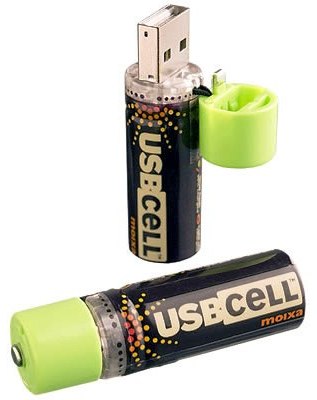
Introducing our revolutionary new rechargeable battery - the USBCELL. Image Credit: Moixa Energy

Exciting USB Power Innovation For Mobility Applications

In the world of portable data collection and business mobility applications, one of the most vexing problems comes down to Ni-Cad or NiMH battery management schemes (will one have the power to do and complete the job at "hand").

An innovation that is simple but brilliant has just been introduced in England and, hopefully soon, to be available here in North America.

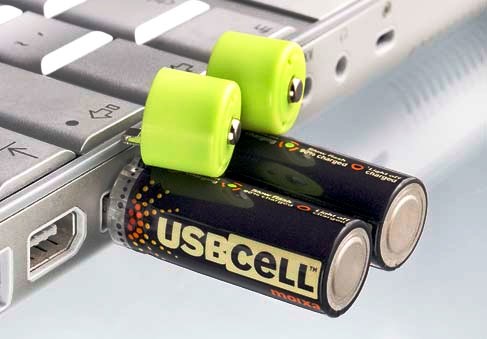
This NiMH AA cell can be used like a normal battery and can be recharged simply by plugging into a USB port. Image Credit: Moixa Energy

Batteries that recharge directly from the powered USB port of any properly port equipped computer.

Excerpts from Trusted Reviews -

USBCELL: Batteries That Recharge Through USB
Author: Gordon Kelly, Trusted Reviews - Published 20th September 2006

I love innovation - who doesn't? That said, my tastes lie specifically in the kind which make my life simpler and easier. We're talking email over post, wireless over wired, LCD over CRT and potentially now 'USBCELL' batteries over your traditional AAs.

Produced by Moixa Energy, USBCELL batteries are simply batteries that recharge from any USB port. They require no separate recharging devices, cradles or cables and can be used exactly like a normal battery. The design itself is rather like a typical memory stick with its flip top lid and they could be set to deliver the same killer blow to the battery market that memory sticks did to floppy discs.

At this stage the one unknown is how well they perform when compared to their established counterparts and how long they take to charge. The new wave is coming, however, and though they launch in the familiar AA they will soon comprise a full range of standard formats including phone and camera batteries and come with C & D size converters.

Available now and costing just 12.99 British Pounds
[ed. approximately $24.50] for two AA USBCELL batteries (including VAT and delivery from the company's website) I'm forced to say something I never thought would pass my lips: I'm quite excited about batteries.
Reference Here>>


After careful review of the manufacturer's website, here are a few Frequently Asked Questions that should help to fill in some of the understanding of this new and exciting portable equipment power innovation.

User Instructions FAQs

How long do USBCELLs take to charge through a USB port?

USBCELL will charge in about 5 hours to 90% charged, or less if the battery was not fully drained, and then enter a trickle charge mode (LED flashing). The LED will go off after this.

Can USBCELL's be charged in NiMH battery chargers?

Yes. USBCELLs can be charged in any good quality overnight or quick (5-7 hour) battery chargers designed for Nickel Metal Hydride (NiMH) batteries. The recommended charge is 250mA for 7 hours. Consult your NiMH charger manual to confirm suitability. With the cap on, they work just like a normal rechargeable NiMH battery as the circuitry is bypassed. Do not use fast chargers which claim to take less than 1 to 2 hours.

Will USBCELLs suffer from the 'memory' effect?

Rechargeable cells can be recharged hundreds of times but the lifetime will reduce slightly if cells are always partially charged or topped up. The User Guide gives instructions for how to prolong USBCELLs life and maintain best performance. However, since USBCELL is capable of several hundred charges, occasional top-ups when you need urgent power will not have a significant effect.

Can the USBCELL be used in devices that normally take 1.5V (alkaline) throw-away batteries?

Yes, USBCELLs, like other rechargeable cells, should work with almost all AA-powered devices.

Example of consumer electronic devices using AA cells. Any portable data collector or hand held computer that can use AA cells can benefit from USBCELL solutions. Image Credit: Moixa Energy

Do USBCELLs require drivers to work with my computer?

No, USBCELLs draw power from the USB socket and do not need any special drivers to charge.

Can I use fast chargers to charge USBCELLs?

USBCELLs should not be used with any charger rated at a current above 600mA. In general USBCELLs should not be charged by any charger that has a charge time of less than 2 hours.

Is USBCELL faster to charge than normal rechargable batteries?

USBCELL takes about 5 hours to charge, this is normally classed as fast charging. They will charge in the same time as other rechargeable batteries of the same capacity in a normal NiMH charger.

Top-Up - Charging for just a few minutes provides extra hours of instant use for most input devices. Adaptors soon for C and D cells. Image Credit: Moixa Energy

Does the USBCELL last as long as other rechargeable batteries?

The capacity of USBCELL is 1300mAH - this is greater than some ordinary NiCd and NiMH batteries. Some new high-capacity NiMH batteries can go up to 2500mAH. However, with USBCELL you can simply recharge or top-up by plugging into a USB port rather than going off to find a wall charger and adaptor. Also, make sure that the battery is fully charged - the charge should take about 5 hours by USB and the light should go off when USBCELL is fully charged.

Does the type of USB port matter?

Most USB ports are 'powered' and capable of providing up to 500mA current at 5 volts (USBCELL should draw about half of this maximum current). Because of the AA size of USBCELL, it may be difficult to insert into some inaccessible or recessed USB ports. If it's difficult to insert, don't force it!

Can I charge from a USB hub?

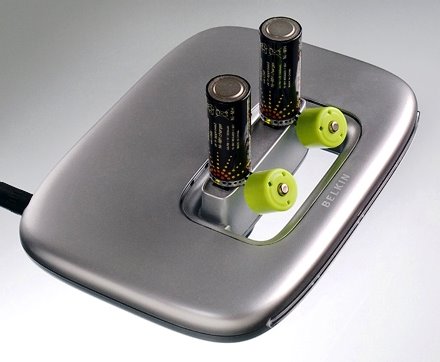
USBCELLs can be charged in most powered USB hubs. These should be connected to an external power supply during use. In some powered hubs, USBCELLS can be charged even without the connection to a PC, provided that the power is connected. Some USB hubs are not separately powered, and so these may not provide enough power to each socket. If you do need to use an unpowered hub, we recommend that only one USBCELL is charged at one time, with no other high-power peripherals connected.

Recharge in Powered Hubs - Multicell charging in Hub. Image Credit: Moixa Energy

How do I know my USBCELL is charged, when charging in a USB port?

A small LED light at the USB plug end of each USBCELL indicates that it is charging. If the cell is already charged the LED should start flashing within 15-25 minutes and stop after a further 10 minutes of top-up charge. If the cell is less charged, the LED will stay on and the battery will continue charging until full charge is detected at which point the LED will flash for 10 minutes. If the USBCELL was fully discharged it will charge for 5 hours and then trickle charge for 90 minutes. When the LED switches off then the USBCELL is fully charged. Batteries get warm during charging, to a peak temperature when fully charged. It is therefore not recommended that you recharge batteries immediately after charging. Batteries should always be charged at room temperature.
Reference Here>>